A simple tour
How it works
You don’t need a manual to get started. Here is the idea, one step at a time. Press Update results after you change something. That’s the golden rule.
-
Join, then sign in
New members can join here. Once you have an account, sign in to the members area with the username and password you used when you paid. Privacy
To open PR Ratings V3, go to prratings.co.uk/prv3/app and type your member id. It’s a number. If you’ve forgotten it, the members area is the place to start. Lost your password? You can request a new one.
-
Set the scene
At the top you’ll see the standing settings. Pick the country, the type of bet and the race types you care about. Set the dates for History if you want a different period. Leave the rest alone at first if you’re not sure.
-
Add a few cards
On the left is the filter list. Add a card by dragging it onto the main area, or by pressing + beside its name. On a phone, + is easier than dragging.
Set the From and To values. For example, on the Runners card, pick 8 and 12. A card does nothing until it differs from its usual range. The usual range for Runners is 2 to 50, which means every race.
-
Press Update results
This is the one to remember. When you change a card or a setting, the figures do not change straight away. Press Update results to run your system again.
Two settings update the screen by themselves: Type of bet, and Based on which price.
-
Look at today, then look at the past
Scroll to Today’s races to see which horses fit. Scroll to History to see how the same rules would have done over your dates. If you like, open Quick analyse on a card, try Does it hold up?, or press Watch the race.
-
Give the figures a closer look
When the History figures look interesting, press Run the deeper checks. That tells you which filters are doing the work, and whether a setting is Steady or on a knife-edge.
You can also press Find the best settings. Tick up to three number ranges, and the app tries the lists for you. It then tests the best ones on months it has not seen, so a lucky run is less likely to fool you. Past results do not predict future results.
-
Save it, if you like it
Type a name and press Save as new. Tomorrow you can open it in two clicks. Once it’s saved, you can copy the Browser link or the Bot Link.
A small example
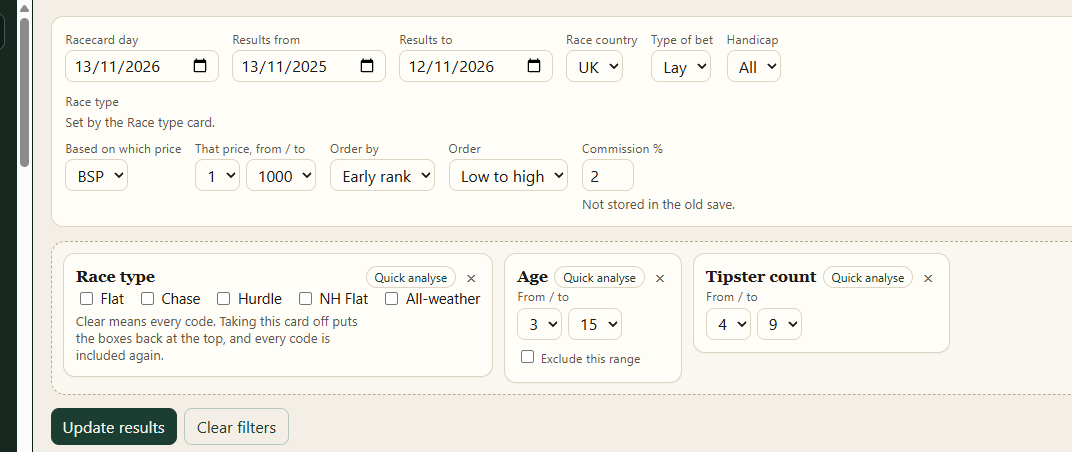
Here’s a simple system, just to show the idea: back the early favourite in UK races with 8 to 12 runners.
You would set Race country to UK and Type of bet to Back. Then add the Runners card and set it to 8 to 12. Add the Early rank card and set it to 1 to 1. Press Update results.
That’s it. You can now see today’s early favourites in those fields, and how the same idea would have done last year. Whether it looks any good is for you to decide.
A few things that surprise people
- Place and place lay bets only use races with 5 or more runners. The Runners card may appear on its own with the note “Set by the bet type”. That’s normal.
- Dates are not stored in a save. When you open a system, check the dates and press Update results.
- A BSP, SP or place BSP price range is not sent to a betting bot. The app will warn you. A bot has to bet before the off, so it cannot know the starting price in time.
Free video course
Get the free 7-part “How to create a System” videos
One short video a day, by email. I show you how I build a racing system, step by step, in PR Ratings V3. It’s free, and you can unsubscribe at any time.
The sign-up form is loading. If you can’t see it, email malcolm@bluebelldata.co.uk with “Free videos” and I’ll send them to you.
You must be 18 or over. Bluebell Data (PR Ratings) will use your email to send you these free videos and, from time to time, emails about PR Ratings. You can unsubscribe at any time with the link in every email. See our privacy policy. We’ll send a confirmation email first. Please click the link to start the videos.